Why does the system show an error that "This section’s KPIs do not equal 100%" even though my weightings seem correct?
The issue is usually due to decimal rounding differences when assigning KPI weightings. Even small discrepancies can prevent the total from reaching exactly 100%.
Navigate > Employee > Performance > KPI's

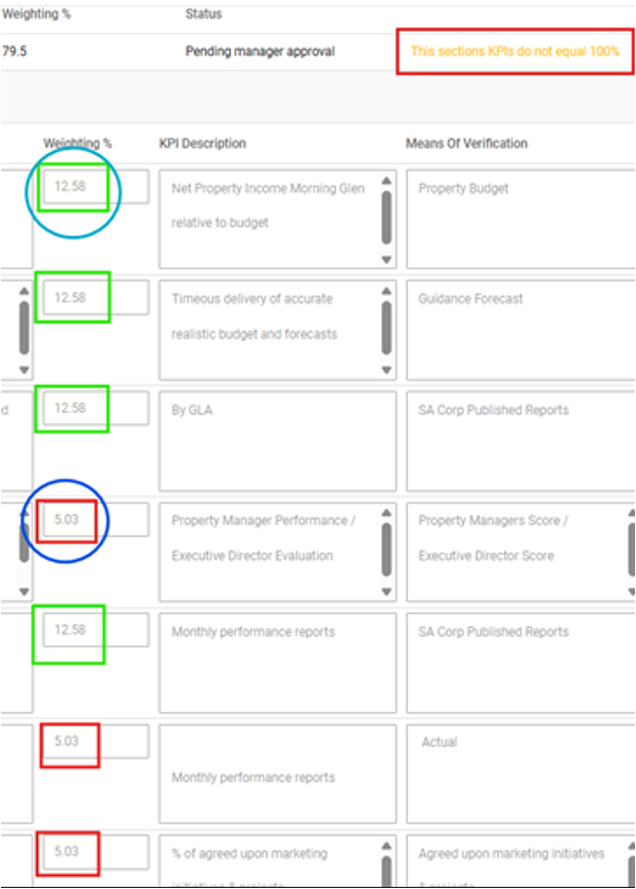
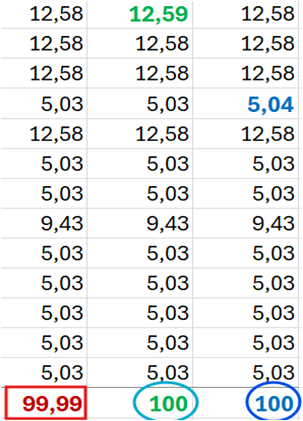
Step 1: Ensure that the total weighting for the section equals 100%.
Step 2: If the total is slightly off (e.g., 99.99% or 100.01%), adjust the first weighting's decimal value slightly.
The system will then recognise the total as 100%.
Related Articles
How do I resolve the KPI error: "This sections KPI's do not equal 100%" ?
This feature is available on Premier and Master editions The error "This sections KPI's do not equal 100%" will display because the KPI on the Template Section does not equal 100%. Navigate > Config > Human Resources > Performance Management > ...How do I resolve the KPI error: "the weightings on the sections do not equal 100%" ?
This applies to Premier and Master editions The error will display if the total weightings of all the KPI Sections added together do not equal to 100%. Check that all the KPA Sections weightings add up to 100. Navigate > Employee > Performance > ...Why are there no KPIs displayed on employees' KPI's screen?
This applies to the Premier and Master editions If an employee is not linked to a Process Type, their KPI's screen will display the following error message: Navigate > Employee > Performance > KPI's Step 1: Create KPI's on the KPI Setup screen. ...How do I change an evaluation's section's weightings ?
This feature is available on the Premier and Master payroll edition. Each section's weighting on an evaluation can be changed on the Template Definition screen. Navigate > Configuration > Human Resources > Performance Management > Template Definition ...How do I upload KPIs on an employee record?
This feature is available on Premier and Master editions Make use of the following steps to load KPIs on employee profiles. Step 1: Create KPI's on the KPI Setup screen. Navigate > Config> Human Resources > Performance Management > KPI Setup Step 2: ...