How do I reactivate an inactive (blocked) user account?

This feature is available on all Deel Local Payroll powered by payspace payroll editions
A blocked user profile can be reactivated by changing the status of the user's profile from "Inactive" to "Active".
Step 1: Access the affected users profile on the User Profile screen.
Navigate > Config > Security > Security > User Profiles
Step 2: Change the status from "Inactive" to "Active."
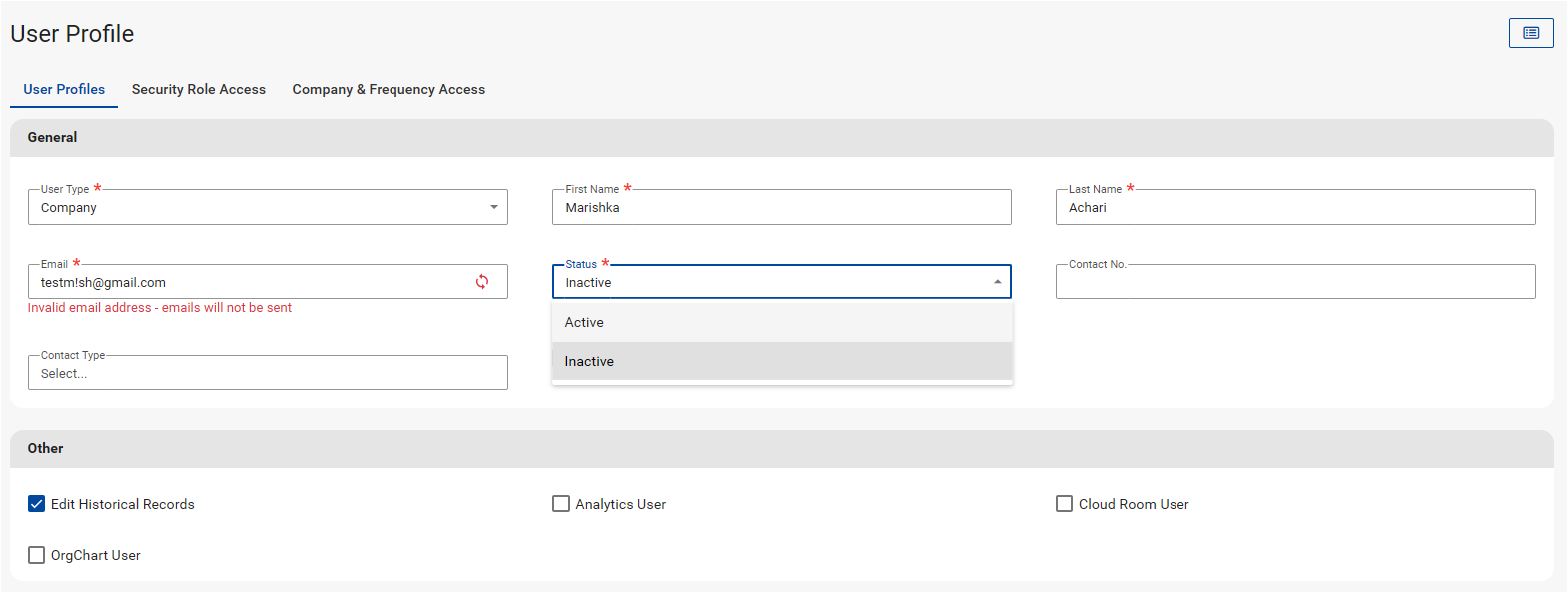
Alternatively, inactive profiles can be reactivated on the Activate Users screen.
Navigate > Config > Security > Security > Activate Users
Thereafter, the user can login using their password or they can prompt a password reset.
Important Comment
This applies to Company and Employee level users.
Related Articles
Security | Adding a User Profile
Overview User Profiles are used to create and maintain company level users on the payroll. User Profiles are also used to specify which employees a user can access on company and frequency level. When defining a User Profile, the relevant Security ...How do I reactivate an inactive company?
Contact the Finance department at finance@payspace.com in order to reactivate an inactive company.Security | Activating a User
Overview User profiles are automatically made inactive when a user has five incorrect login attempts. The user profile can be made active again on the User Profiles Screen or the Activate Users Screen. Edition This feature is available on all Deel ...Why does the system redirect a company level user to their ESS profile when they attempt to access their employee record?
When a company level user attempts to access their employee record as an admin user, the system will redirect them to their ESS profile if they do not have access to edit their own profile. To ensure that company level users can edit their own ...How do I remove a company level user's access to the system?
A Company level user profile's status can be made "Inactive" on the User Profiles screen, to remove their system access. Navigate > Configuration > Security > Security > User Profiles Step 1: Select the user profile from the company or employee User ...