Angola | How Do I Exempt An Employee From Social Security?
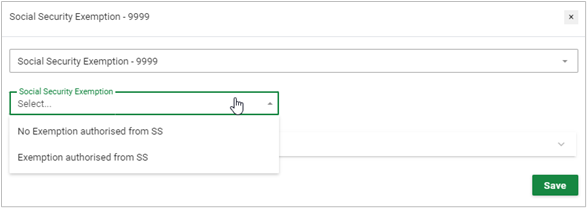
To exempt an employee from Social Security, the "Social Security Exemption" component is available for use and would be added on the employee's Recurring Payroll Component screen (Employee > Payroll Processing > Recurring Payroll Components). This can also be done via Bulk Actions.
Select the applicable selection from the drop-down menu.
Related Articles
Angola Product User Guide
To aid our users in the understanding and application of compliance in Angola, PaySpace has released an external Product User Guide. This is a "How to guide" to follow during country implementations, company maintenance and for support queries.Angola Payroll Tax Guide 2026
The Angola Payroll Tax Guide is an easy-to-understand summary of statutory contributions associated with payroll for the 2026 tax year.Egypt | How to exempt employees from Social security contributions
The Egypt mandatory Social Security contributions can be exempted under circumstances where the employee contributes towards social securities outside the borders of Egypt. To apply the exemption navigate to Employee > Basic Information > Basic ...Egypt | How to exempt Directors from social security contributions
Within Egypt the option to exempt Directors of a company from the standard social security can be applied by highlighting a Director status. Navigate to Employee > Tax Profile Ensure the employee record tax status field is set to Directors from the ...Namibia | How do I exempt an employee from Social Security?
Enabling the "Exempt from Social Security" checkbox will result in the removal of the Social Security deduction, company contribution and income base from the payslip. Navigate > Employee > Basic Information > Basic Profile > Employee > Statutory ...