How do I configure a Night Shift Allowance component?

This feature is available on all Deel Local Payroll powered by payspace editions
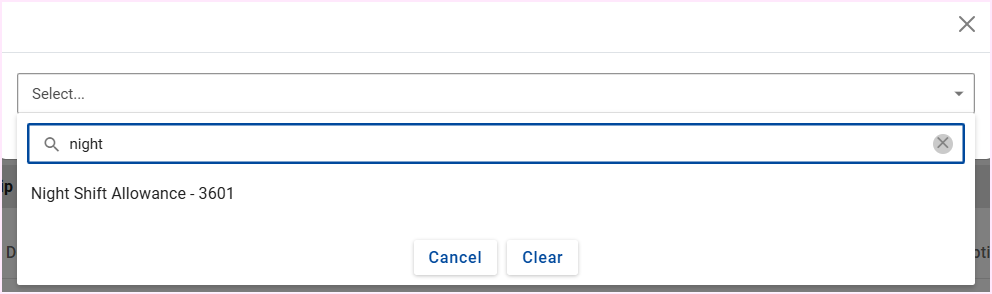
Step 1: Search for and select the Night Shift component.
Navigate > Config > Payroll > Payroll Config > Payroll Components
Step 2: Specify the Overtime Factor.
Step 3: Select and define the income base for the component.
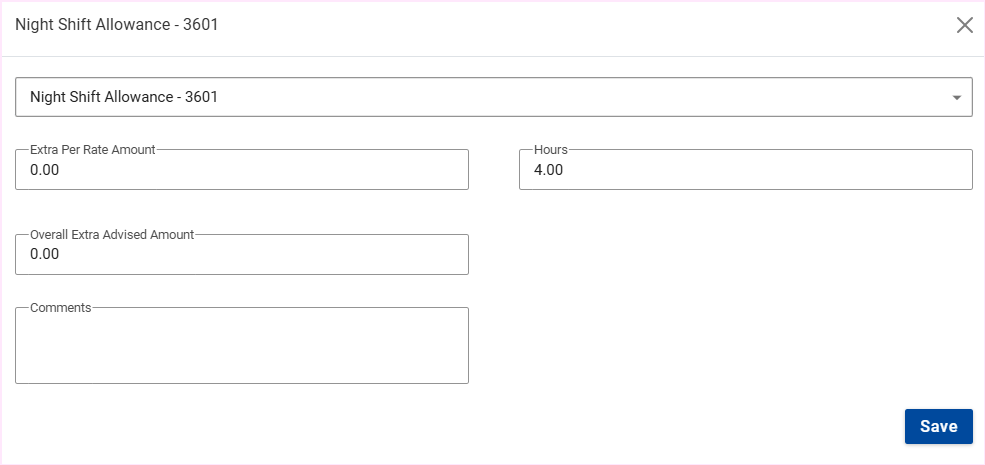
Step 2: Link the component to the employees via their Edit Payslip screen or via the Bulk Actions screen.
Navigate > Employee > Payroll Processing > Edit Payslip > Allowances
Related Articles
How do I configure the Overtime component?
This feature is available on all Deel Local Payroll powered by payspace editions The Overtime component has to be configured on company level before adding it to an employee. Step 1: Search for and create the required Overtime component. Navigate > ...How do I configure a Standby Allowance component?
This feature is available on all Deel Local Payroll powered by payspace editions A Standby Allowance component can be created using the Other Allowance Taxable (3713) component as a base component. Navigate > Config > Payroll > Payroll Config > ...How do I configure a Medical Aid Allowance component?
This feature is available on all Deel Local Payroll powered by payspace payroll editions A Medical Aid Allowance component can be created using the Other Allowance Taxable (3713) component as a base component. Navigate > Config > Payroll > Payroll ...Why is the Loan Deduction component not reflecting on the employees Edit Payslip screen after being added on the Recurring Payroll Components screen?
This feature is available on all Deel Local Payroll powered by payspace payroll editions The Loan Deduction component may not reflect on the employee's Edit Payslip screen because the loan's opening balance is R0.00. Navigate > Employee > Payroll ...Payroll Processing | Recurring Payroll Components
A Recurring component refers to a regularly appearing component in an employee's payroll that is a part of the employee's regular compensation package. These components are calculated and included in each pay period, and are an essential part of an ...